The math of building an app alone can be quietly brutal. When you are a solo software developer, marketing is usually the responsibility you are most tempted to resent. You spend months refining on-device recommendation math, polishing animation timing, and tuning typography, only to confront the cold reality of launch: software does not distribute itself. If people do not know your app exists, it does not matter how thoughtful the code is.
So earlier this summer, I committed to posting movie recommendation carousels on TikTok every day. And almost immediately, I ran directly into the creator's trap.
The Forty-Five Minute Tax for Four Hundred Views
If you have ever posted organic content on short-form video platforms without paid ads or an existing audience, you already know the routine. You spend hours scripting, editing, and polishing something you care about, hit publish, and watch it settle into the standard baseline: three hundred to five hundred views, a few saves, a couple of likes, and occasionally a mysterious stall at zero views for reasons known only to the platform's distribution servers.

There is nothing wrong with four hundred views when you are starting from scratch. Four hundred real people stopped to look at four movies I recommended. The problem is not the audience size; the problem is how much it cost you to get there.
In the beginning, I built every carousel by hand in standard design tools. Each post was a multi-slide visual essay that needed to look like an extension of WhatNext.'s visual identity: dark gallery backdrops, elegant serif headlines, high-resolution poster art, and precise typographic balance.
Achieving that meant a grueling sequence of manual steps. I had to hunt down pristine theatrical posters, drop them onto a vertical 9:16 canvas, manually sample a complementary background tint from the movie's key art, adjust a radial gradient so the text remained readable, and re-balance the font size so that a short title like Moon and a long title like The Grand Budapest Hotel did not look awkwardly disproportionate.
By the time I finished tweaking margins, exporting image files, and transferring them to my phone, forty-five minutes had evaporated.
When you spend nearly an hour crafting a visual layout and it reaches a few hundred people, your brain conducts a fast, subconscious return-on-investment calculation. It tells you that marketing is a grind, that social media is a waste of time, and that you should probably give up. Friction kills consistency long before the algorithm ever has a chance to find an audience.
Treating Friction as an Engineering Problem
After a couple of weeks of fighting templates, I realized my mistake. The problem was not marketing, and it was not the platform. The problem was the tooling.
General-purpose design apps like Figma, Canva, or Photoshop are marvels of modern software, but they are designed for infinite flexibility. They want you to have total control over every vector point and text box. But daily publishing does not need infinite flexibility. Daily publishing needs strict aesthetic constraints, repeatable rules, and maximum speed.
Instead of burning my creative stamina on pixel-pushing every morning, I treated production drag as an engineering challenge. I opened my code editor and spent several focused sessions building my own native desktop tool, which I named Showroom.
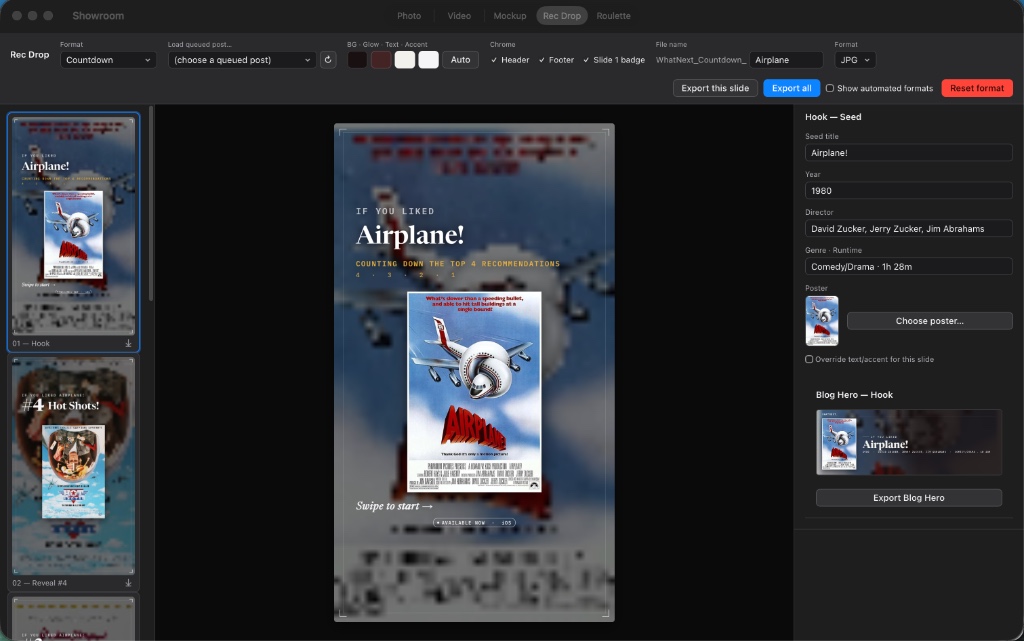
Showroom did not arrive fully formed on day one. When I first built it, the app only supported a single format: the classic recommendation set. But by breaking production drag into specific engineering problems, each iteration unlocked another layer of speed and craft:
- Dedicated Post Assembly (The Primary Breakthrough): The overarching bottleneck was the daily ritual of opening heavy, general-purpose design software to do repetitive visual layout. The first version of Showroom was built to solve that central problem: providing a dedicated, single-window environment to stage a title, arrange four recommendations on a fixed 9:16 canvas, and export finished slides immediately without wrestling with layers, artboards, or manual file management.
- Typographic Auto-Fitting: Film titles vary wildly in length. In that earliest version, Showroom measured character strings against a strict vertical height budget, dynamically adjusting font size and line breaks so that a short title like Moon and a long title like The Grand Budapest Hotel both looked deliberate without any manual resizing.
- Automated Palette Extraction (Eliminating Friction): Early on, I still had to sample background tints and text tones by hand with an eyedropper. As daily use revealed where remaining seconds were leaking, I added dynamic color extraction: analyzing the poster art on import to calculate a calibrated dark backdrop, subtle glow, and readable text contrast automatically.
- Full-Bleed Blurred Backdrops (A Scalable Visual Redesign): Once Showroom stabilized the workflow, it unlocked something unexpected: the ability to make the visual design significantly more ambitious. Later in the summer, I undertook a major visual redesign, rotating the key art into a full-bleed, softly blurred backdrop layered under a linear scrim. In a manual tool, building that effect every morning would have been exhausting; in Showroom, the added aesthetic complexity was free.
- Extensible Format Architecture (Multiplying the Leverage): Because the rendering pipeline and design rules were programmatic, expanding beyond that original format became effortless. When I wanted to experiment with new editorial structures, such as progressive countdown reveals or movie trivia cards, it took an afternoon of coding rather than rebuilding dozens of canvas templates from scratch.
What used to require dozens of clicks, manual color pickers, and endless export dialogues became a single, seamless pipeline. Dropping in a film title and four recommendations now takes less than five minutes.
Decoupling Effort from the Algorithm
I have not had a massive viral breakout on TikTok yet. Most posts still pull in a few hundred views, with the occasional video climbing higher when a specific movie pairing strikes a nerve.
Before I built Showroom, that lack of an explosive breakout would have felt demoralizing. When a post costs an hour of intense effort, you naturally attach your emotional state to its performance. You need the video to succeed to justify the time you spent making it.
Once the production cost collapsed to five minutes, everything shifted.
When creating a polished carousel takes just five minutes of focused input, you stop caring about short-term view counts. The emotional tax disappears. I can publish daily without feeling drained, because I am no longer sacrificing hours of app development to feed a distribution channel.
More importantly, it turned social posting from a chore into a low-stakes laboratory. Having a frictionless factory allowed me to experiment with different presentation formats: moving from simple recommendation cards to progressive countdown reveals, and testing how people react when an obscure European arthouse film is anchored alongside a beloved American sci-fi classic. Over a hundred posts later, that sustained consistency only exists because the friction was eliminated early.
Building Leverage as a Solo Founder
There is a common assumption in software development that internal tools are a luxury reserved for large companies with dedicated developer productivity teams. When you are a solo founder, building an app just to help you post on social media can feel like an indulgence or a distraction from the real product.
In reality, building custom leverage is the single most important survival skill for an indie developer. You cannot outspend venture-backed competitors, and you cannot hire an agency to manage your community. Your only competitive edge is the ability to move quickly and sustainably without exhausting yourself.
Showroom embodies the exact same design philosophy as WhatNext. itself: solving real friction with purpose-built software, refusing to compromise on visual craft, and building systems designed for the long game. Sometimes the most important feature you build is the one that allows you to keep showing up.